
Write & Edit PDF - PDF Merger2.0 - App Store
You'll be able to see results in few seconds.
Publisher Description



Scanner:
- Scan receipts to keep track of travel expenses Convert paper notes and sketches into digital copies Save interesting articles and book pages for further reading .Scan , Bill, Invoice, Contract, Tax Roll, Business Card, Whiteboard, Memo, Script, Letters, Blackboard, Note, PPT, Book, Article, Credential, Certificate etc All scans can be saved as a PDF or Can be saved in a Folder within app.
- Adjust photo brightness and color saturation of each Scan Image
- All scans are saved as JPEG files , PNG , or PDF and can be exported as PDF files from selected pages.
PDF Reader :
- Built In PDF Reader with lots of Option Such As bookmarks , zoom in / out , Email Attachments , print etc.
Document writer :
- Create and Edit Rich Text Documents on your iPhone or iPad. Work on your Documents even when not connected to the internet. Open , Edit files created through this app from any other app that supports the “Open In” feature .
- View/Edit/Create Rich Text Documents and PDF
- Fonts, Styles,Font Sizes, Bold, italic, Underline, Strike out , Text Color, Background Color selection, Text Alignment, Undo Changes, Easy Copy and Paste etc
Sign PDF Documents on the Go:
- Sign And Send Document anytime any where.
- This feature is useful when someone sends you a document to sign. You don't need to print the document, sign it and then scan and email. Using this app you can sign & send documents instantly. Saves time and money.
Document Manager:
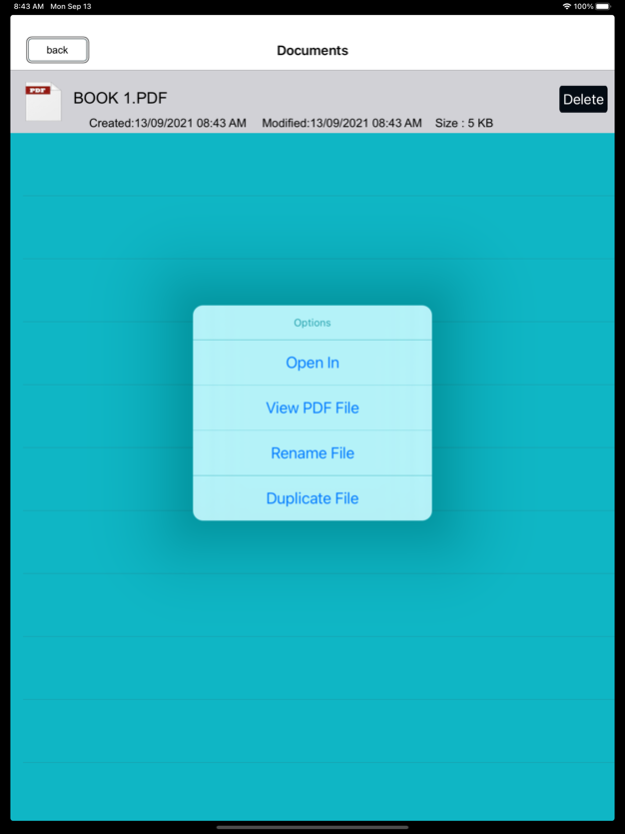
- Track Files with Date , file size.
- Supports Rename , Delete , Copy feature
File Formats:
- MS Word, PowerPoint, Excel, Apple iWork files (Numbers, Pages, Keynote), web page, RTF, Text, MS Office documents , images , photos, RTFD, HTML,CSS, XML, JSP, BMP,CSV, PHP3, PHP4, PHP, Java, JPG, PNG, Safari webarchive TXT,JPEG, BMP, C, CSS, XML, JSP, Maps etc
Email Documents:
- Email Documents on the Go.
Print Master :
- Print All documents wirelessly via AirPrint supported printers.
PDF Merger:
- Simple built in PDF merger let you combine multiple PDF file into 1 PDF file.
- No Limits of Combining PDF files
PDF Converter :
- Built in converter let you convert any thing into PDF.
PDF Annotation :
- Annotate converted PDFs and write your notes on PDF within the app
Export files :
- Upload to Dropbox
- Export to Any other installed app using Open In function.
- Share your PDF and Scanned Document via email, or open in your favorite/installed applications on your device like Evernote, Box, SkyDrive, iBook, GoodReader, PDF Reader etc
Import Files:
- USB file transfer (iTunes file sharing).
- Import files via Open in function
Sep 14, 2021
Version 2.0
optimise for latest IOS
fixed all bug
About Write & Edit PDF - PDF Merger
The company that develops Write & Edit PDF - PDF Merger is Abdul Rahim Khurram. The latest version released by its developer is 2.0.
To install Write & Edit PDF - PDF Merger on your iOS device, just click the green Continue To App button above to start the installation process. The app is listed on our website since 2021-09-14 and was downloaded 0 times. We have already checked if the download link is safe, however for your own protection we recommend that you scan the downloaded app with your antivirus. Your antivirus may detect the Write & Edit PDF - PDF Merger as malware if the download link is broken.
How to install Write & Edit PDF - PDF Merger on your iOS device:
- Click on the Continue To App button on our website. This will redirect you to the App Store.
- Once the Write & Edit PDF - PDF Merger is shown in the iTunes listing of your iOS device, you can start its download and installation. Tap on the GET button to the right of the app to start downloading it.
- If you are not logged-in the iOS appstore app, you'll be prompted for your your Apple ID and/or password.
- After Write & Edit PDF - PDF Merger is downloaded, you'll see an INSTALL button to the right. Tap on it to start the actual installation of the iOS app.
- Once installation is finished you can tap on the OPEN button to start it. Its icon will also be added to your device home screen.
Program Details
System requirements
Download information
Pricing
Version History
version 2.0
posted on 2021-09-14
Sep 14, 2021
Version 2.0
optimise for latest IOS
fixed all bug
Disclaimer
Official App Store Link
We do not host Write & Edit PDF - PDF Merger on our servers. We did not scan it for viruses, adware, spyware or other type of malware. This app is hosted by Apple and passed their terms and conditions to be listed there. We recommend caution when installing it.
The App Store link for Write & Edit PDF - PDF Merger is provided to you by apps112.com without any warranties, representations or guarantees of any kind, so access it at your own risk.
If you have questions regarding this particular app contact the publisher directly. For questions about the functionalities of apps112.com contact us.
